Orca runtime
Projects run from Orca can switch to a second runtime. Each role then runs as its own top-level Claude session, a peer, never as a subagent. A peer has everything the project gives a normal session: every MCP server, project skill and memory plugin, and Bash. Only where a role runs changes. Roles, documents, gates and question docs don’t.
Your own session becomes the coordinator. It routes work, checks gates, keeps status.md and takes your approvals. It does no hands-on work, not even a quick fix or a test run, so it’s always free to answer you and the peers.
Turn it on
Section titled “Turn it on”Add one line to the dev-team section of CLAUDE.md:
- **Runtime: Orca.** Roles run as top-level Orca peers per the dev-team `workflow/orca.md`; never spawn subagents. Team model: opus. Fallback model: sonnet. Advisor: none. Peer size limit: 400k. Worktree cards: off.and deny the subagent tool in .claude/settings.json, since peers are full sessions and would otherwise have it:
{ "permissions": { "deny": ["Agent"] } }/dev-team:orca writes both, and offers the recommended setup. Without the line the default runtime applies, even inside Orca. Every setting on it is in the settings reference.
Homes and worktrees
Section titled “Homes and worktrees”Peers live in named homes: dt-product, dt-designer, dt-architect, dt-reviewer, and dt-dev-1, dt-dev-2 and so on. Each also gets a random first name, so Orca, the Owner board and the coordinator’s reports talk about Bob the developer and Sandra the reviewer. peer team --rename dt-dev-1 Sandra changes one.
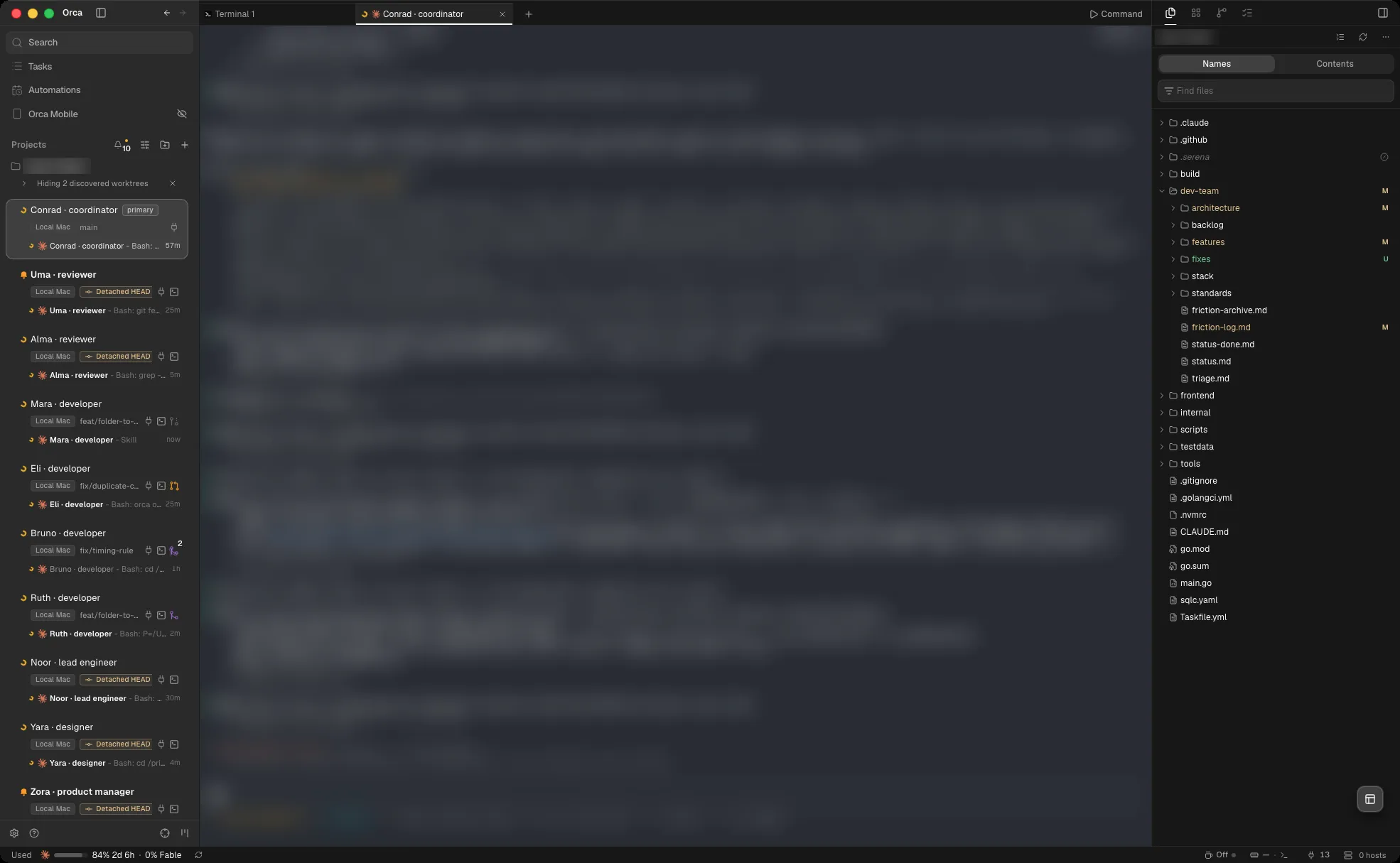
A home is made on its first task, or all at once with peer team --create if you want the whole team in Orca’s sidebar from the start. Setup asks which you want. --create makes only the worktrees, so no usage is spent until each home’s first task.
Roles that work one after another share the feature’s worktree, and only one peer edits a worktree at a time. Independent chains in the task list run as parallel streams, each in its own developer home and child worktree. Streams merge their own work one at a time at the end, then the reviewer starts. A real conflict between them means the plan split the work wrong, so it goes to the principal-engineer as a question.
A fresh session per task
Section titled “A fresh session per task”Every task starts in a new session, so old context can’t mislead it, and new MCP servers, settings and plugin updates load. Each home’s worktree has its own plugin install, so peer dispatch moves it to the main checkout’s version first. Nothing is lost. Specs are self-contained and the work lives in the workspace. One measured peer cost about 35k tokens to start, mostly the project’s own context (what it costs).
Closing a session stops the MCP servers it left running and names anything else, such as a dev server, for you to close. A machine-wide service it happened to start, like Docker Desktop, keeps running. Session caches: on the Runtime line clears per-session caches as well. peer sleep <home> (or --idle) closes a session and keeps its worktree for the next dispatch.
Launch settings
Section titled “Launch settings”Every launch names its model and effort, read from the Runtime line, so a /model typed in another session never reaches a peer.
Team modelis an alias such asopusor an exact id, with an optional effort (opus/high). Peers don’t launch without it. Otherwise each role keeps its default effort, and the Role models line overrides either, per role.Fallback modelis used while the team model is busy or out of usage, until it resets.Advisoris a model the product-manager and principal-engineer (or the roles you name) consult for hard questions and the hard calls in their own plans. Other roles bring their hard questions to those two.
To change the line, edit it and run peer switch in the same turn, which moves the live peers over. DEV_TEAM_CLAUDE adds flags of your own, such as a permission mode, to every peer’s claude command.
The coordinator’s loop
Section titled “The coordinator’s loop”The coordinator runs the team through peer, a helper around Orca’s commands. Between turns it waits on peer watch, which costs no tokens, and wakes when a peer sends a message or needs help: stopped on an error or a usage limit, past its size limit, or working with an unchanged screen for 20 minutes. A failing check or a conflict on a team PR whose owner is idle wakes it too, and goes back to that owner. Plugin hooks keep the coordinator from going idle while anything is unhandled. It never holds its turn on a wait: launches and closes run in the background, and peer tell nudges a peer in the background, so it can keep answering you.
Sharing the machine
Section titled “Sharing the machine”Several peers on one machine run out of memory long before they run out of work, so the coordinator puts idle peers to sleep when their role has nothing coming. That’s its call, not yours. Test runs, builds, browser runs and other heavy jobs take turns through slot run <label> -- <command>: two at a time machine-wide by default, critical path first. Long-lived containers use a separate pool, so they never block tests.
Remote peers
Section titled “Remote peers”A home can run on a connected Orca server with peer dispatch <home> <role> <spec> --on <environment> --worktree <selector>. The coordinator stays on your machine, and messages, the watcher and the guard hooks work the same. A remote launch takes only the model and effort, though, so the fallback model, the advisor and DEV_TEAM_CLAUDE don’t apply there.
Worktree cards and the browser
Section titled “Worktree cards and the browser”Worktree cards: on mirrors status.md onto Orca’s worktree cards and flags a card when you’re needed. It’s a lighter view than the Owner board, and the two can run together. UI checks and mockup snapshots use Orca’s built-in browser instead of Playwright, except keyboard and focus checks: its page never has window focus, so those still run in Playwright.
Check-ins are the other Orca extra: scheduled runs that keep work moving.
Full rules: workflow/orca.md.